
How Much Does a WooCommerce Website Cost in 2026?
If you’re planning to launch an online store with WordPress, one of your first questions is probably:
WooCommerce itself is free, but building and running a professional WooCommerce website isn’t necessarily free.
Depending on your business requirements, a WooCommerce website could cost anywhere from a few hundred dollars to $20,000, $50,000, or significantly more.
A small store using a ready-made theme may require only a modest initial investment.
A growing eCommerce business requiring custom UI/UX, hundreds or thousands of products, advanced filtering, subscriptions, ERP integration, custom checkout functionality, multilingual support, or custom development can require a much larger budget.
This is why asking:
“Is WooCommerce free?”
doesn’t tell you what your actual eCommerce website will cost.
The better question is:
“How much will it cost to build the WooCommerce store my business actually needs?”
In this guide, I’ll explain the real cost of a WooCommerce website in 2026, including hosting, design, development, extensions, payment processing, SEO, maintenance, and custom functionality.
How Much Does a WooCommerce Website Cost in 2026?
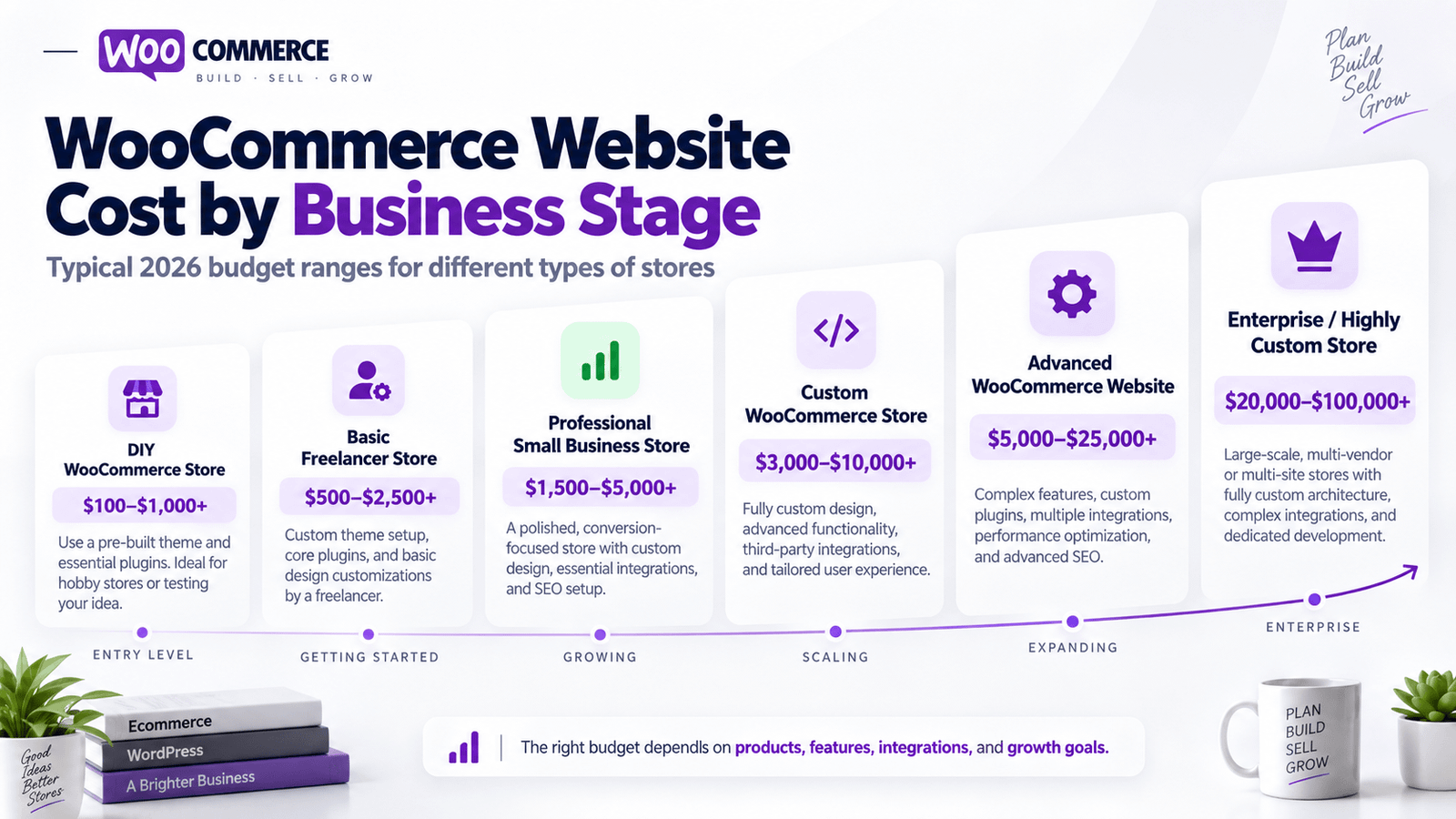
A professional WooCommerce website can generally fall into the following approximate ranges:
| WooCommerce Website Type | Estimated Development Cost |
|---|---|
| DIY WooCommerce Store | $100–$1,000+ |
| Basic Freelancer Store | $500–$2,500+ |
| Professional Small Business Store | $1,500–$5,000+ |
| Custom WooCommerce Store | $3,000–$10,000+ |
| Advanced WooCommerce Website | $5,000–$25,000+ |
| Enterprise / Highly Custom Store | $20,000–$100,000+ |
These are general development estimates rather than fixed prices.
The final WooCommerce website cost depends on your products, design, functionality, integrations, hosting requirements, custom development, SEO, and business goals.
For example, imagine two stores each selling 100 products.
The first requires standard products, basic categories, Stripe payments, and a simple checkout.
The second requires wholesale pricing, customer-specific discounts, subscriptions, advanced product filtering, multilingual content, ERP synchronization, complex variations, custom shipping rules, and API integrations.
Both technically have 100 products.
But they are completely different development projects.
Is WooCommerce Free in 2026?
Yes.
The core WooCommerce platform remains free and open source.
There is no required monthly WooCommerce platform subscription simply for using the core plugin, and WooCommerce does not take a percentage of your revenue as a platform fee.
But that’s only one part of the total cost.
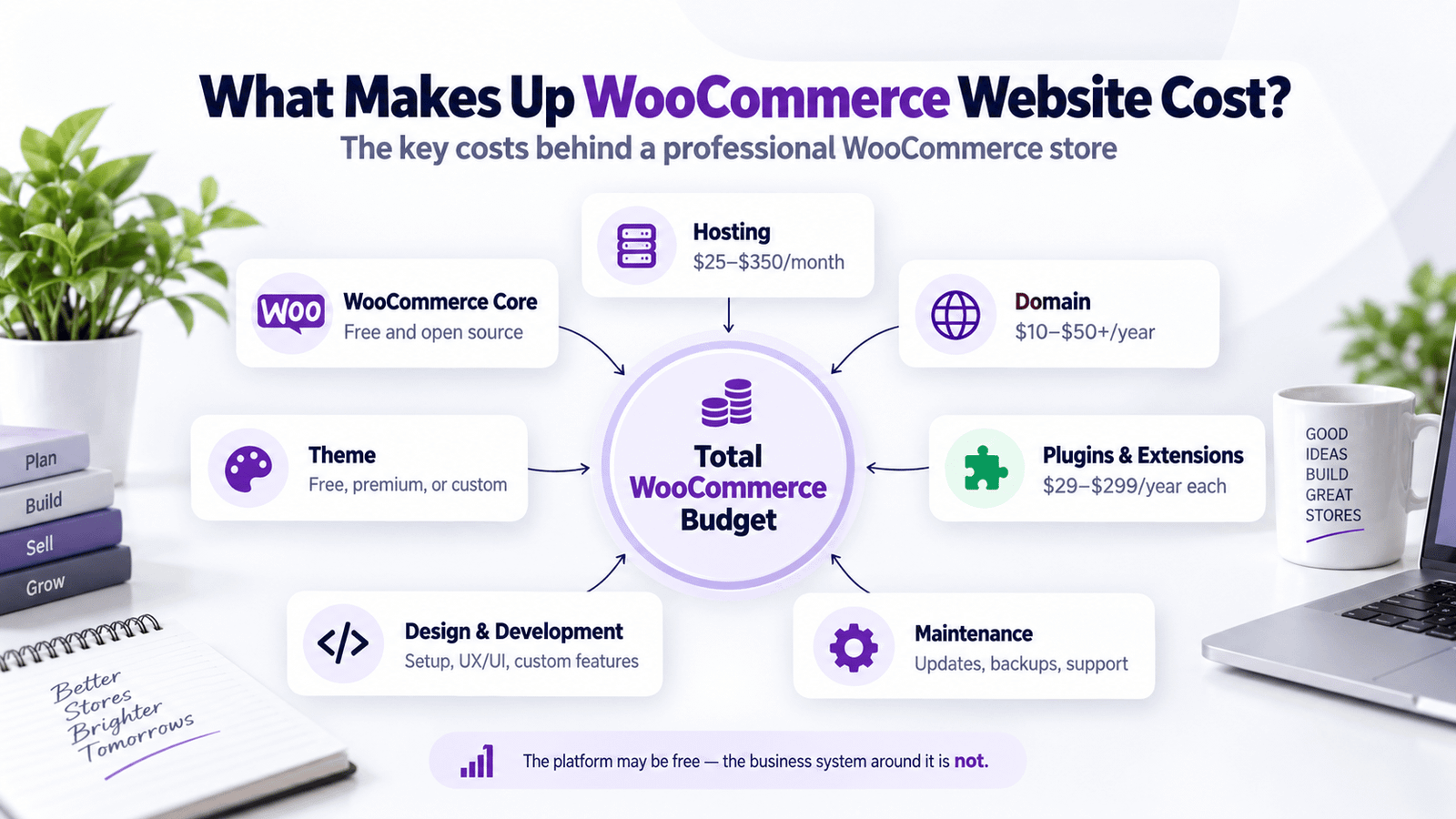
To operate a real WooCommerce store, you’ll normally need to consider expenses such as hosting, domain registration, themes, plugins, design, development, security, payment processing, backups, SEO, and maintenance.
WooCommerce’s current pricing guidance estimates that hosting for most stores can cost roughly $25–$350 per month, depending on performance and traffic requirements. It also notes that paid extensions commonly cost around $29–$299 per year each.
So while the software itself can be free, the complete business system built around it has costs.
Why WooCommerce Website Prices Vary So Much
There isn’t one standard WooCommerce website.
WooCommerce can power a simple store selling ten products or a large eCommerce operation with thousands of products and sophisticated business workflows.
Your store might require nothing more complicated than:
Product → Cart → Checkout → Payment.
Another business may require:
Product → Custom configuration → Dynamic pricing → Customer account → Subscription → Wholesale rules → Multi-location inventory → ERP synchronization → Customized checkout → Automated fulfillment.
Naturally, the second website requires much more planning and development.
This is why professional WooCommerce quotes should be based on business requirements, not simply the number of pages.
What Do You Actually Pay for When Building a WooCommerce Store?
Your budget can be divided into several major areas.
These include the technical infrastructure needed to operate the store, the customer-facing website, and the systems required to support your business behind the scenes.
1. Domain Name Cost
Your domain is your website address.
For example:
yourstore.com
A standard domain may cost approximately:
$10–$50+ per year
depending on the domain extension, registrar, and availability.
Premium domains can cost substantially more.
If you already own your domain, it can normally be connected to your new WooCommerce website.
The domain itself is usually one of the smallest expenses involved in building an eCommerce business.
2. WooCommerce Hosting Cost
Hosting is much more important for WooCommerce than many store owners realize.
Your hosting environment affects:
Website speed, checkout performance, database performance, security, uptime, scalability, and customer experience.
WooCommerce’s current official pricing guidance puts hosting for most stores at approximately $25–$350 per month, while higher-traffic stores may require more powerful infrastructure.
Cheap Shared Hosting
Basic shared hosting can work for a very small store.
It may be suitable when you’re starting with limited traffic and relatively simple products.
However, the cheapest hosting can become problematic as your store grows.
WooCommerce performs many dynamic operations involving:
Products, sessions, carts, customers, orders, inventory, payment requests, searches, and database queries.
These operations need reliable server resources.
Managed WooCommerce Hosting
A serious eCommerce business may benefit from managed WordPress or WooCommerce hosting.
This can provide improvements such as stronger server performance, backups, caching, security, staging environments, and technical support.
For stores generating significant revenue, choosing hosting purely based on the lowest monthly price is rarely the best strategy.
A slow checkout page that costs you customers is far more expensive than spending slightly more for reliable hosting.
3. WooCommerce Theme Cost
Your theme controls much of the basic presentation and layout of your website.
You can choose between free, premium, or completely custom solutions.
Free WooCommerce Theme
Cost:
$0
A high-quality free theme can be suitable for:
Startups, simple stores, small catalogs, and businesses testing a new product idea.
The theme itself being free doesn’t mean your finished website has to look cheap.
A developer can customize a free theme significantly.
Premium WooCommerce Theme
Premium WordPress and WooCommerce themes commonly cost somewhere around:
$50–$200+
depending on the developer, licensing model, and included functionality.
A good premium theme may already include useful layouts for products, categories, carts, headers, and other store elements.
That can reduce development time.
However, buying a large theme containing hundreds of features you don’t need can also create unnecessary complexity.
Choose your theme based on what your store actually needs.
Custom WooCommerce Theme
A custom-designed WooCommerce website can cost significantly more.
Instead of adapting your brand to a pre-built template, the website is designed around your:
Brand, products, audience, content, business goals, and customer journey.
That requires UX planning, UI design, development, mobile optimization, and testing.
4. Professional WooCommerce Design Cost
Professional WooCommerce website design might cost anywhere from:
$500–$10,000+
depending on the level of customization.
Basic work might involve configuring an existing design system.
More advanced projects can include custom layouts for:
Homepage, shop, categories, products, search, cart, checkout, customer accounts, landing pages, and promotional campaigns.
Why Good eCommerce Design Matters
A WooCommerce store shouldn’t simply look impressive.
Every major design decision should help the customer move closer to purchasing.
For example:
Can customers immediately understand what you sell?
Can they find the right category?
Can they compare products?
Can they understand the difference between variations?
Can they easily find shipping information?
Are reviews visible?
Does the product page answer their questions?
Is the Add to Cart button obvious?
Does checkout feel trustworthy?
Good eCommerce UI/UX solves these problems.
5. WooCommerce Development Cost
Development cost depends on how much technical customization your store requires.
A relatively simple WooCommerce project might cost:
$500–$2,500+
A professional customized store might cost:
$1,500–$10,000+
Advanced custom WooCommerce development can reach:
$10,000–$50,000+
and complex enterprise systems can cost more.
Custom Development May Include
WooCommerce hooks and filters, custom checkout functionality, custom product fields, custom plugins, product configurators, dynamic pricing, role-based pricing, subscription systems, API integrations, custom dashboards, ERP connections, CRM integrations, automation, advanced shipping logic, product import systems, and other business-specific functionality.
This is where WooCommerce becomes particularly powerful.
Because WordPress and WooCommerce are open source, experienced developers can customize almost every part of the store.
That flexibility is one of WooCommerce’s biggest advantages.
But advanced customization requires development expertise.
6. WooCommerce Plugin and Extension Costs
Plugins extend the functionality of your store.
Many WooCommerce stores use additional extensions for functionality such as subscriptions, bookings, product bundles, advanced shipping, filtering, memberships, wholesale pricing, product add-ons, and automation.
WooCommerce currently estimates many extensions at around $29–$299 per year each.
Current examples from the official WooCommerce marketplace include WooCommerce Subscriptions at $279 annually, WooCommerce Bookings at $249 annually, Product Bundles at $79 annually, and AutomateWoo at $159 annually at the time of writing.
Plugin Costs Can Add Up Quickly
Imagine a store using paid solutions for:
Subscriptions, product options, advanced shipping, filtering, invoices, email automation, wishlist functionality, multilingual content, and backups.
Even if each plugin looks affordable individually, recurring annual costs can become significant.
This is why your developer should consider whether a feature is better handled with an existing plugin or custom development.
Sometimes the plugin is clearly the better choice.
Other times, a lightweight custom solution can reduce unnecessary dependency and recurring costs.
7. Payment Gateway Costs
WooCommerce lets you choose your payment processor.
Popular options include:
WooPayments, Stripe, PayPal, local payment gateways, bank transfer, and other regional solutions.
WooCommerce does not charge an additional platform fee simply for choosing your payment provider, but your payment processor normally charges transaction fees.
WooPayments uses a pay-as-you-go model and does not charge setup or monthly fees for online payments. Transaction rates vary depending on your country, customer location, currency, and payment method.
Payment-processing costs should therefore be calculated according to:
Your country, sales volume, average order value, payment methods, international transactions, and chosen processor.
For a high-volume store, even a small difference in payment fees can become important.
8. Product Setup Cost
Product setup can be one of the most underestimated parts of a WooCommerce project.
Uploading 20 simple products is relatively easy.
Managing 5,000 products with complex variations is completely different.
Product setup can involve titles, long descriptions, short descriptions, SKUs, pricing, sale pricing, images, image galleries, inventory, categories, tags, attributes, variations, weight, dimensions, shipping classes, downloadable files, specifications, SEO metadata, and custom fields.
Simple Products vs Variable Products
A simple product might have:
One product, one price, one Add to Cart button.
A variable product might contain combinations such as:
Color × Size × Material × Length.
If you have many combinations, product management becomes considerably more complex.
Large stores often require bulk import, CSV processing, ERP synchronization, or custom automation instead of manually creating every product.
9. WooCommerce Product Filtering Cost
Product filters become increasingly important as your catalog grows.
A small store selling 12 products may not need complex filtering.
A store selling thousands of products usually does.
Customers may need to filter by:
Brand, category, size, color, price, material, compatibility, model, specification, availability, or other product attributes.
Good filtering improves product discovery.
Poor filtering makes customers work too hard.
Advanced AJAX filtering, dependent filtering, attribute-based product finders, and custom search systems may require premium plugins or custom development.
10. WooCommerce SEO Cost
WooCommerce provides a strong foundation for SEO because it runs on WordPress, but simply installing WooCommerce does not automatically generate Google rankings.
Professional eCommerce SEO can involve:
Keyword research, category architecture, product optimization, technical SEO, internal linking, metadata, image optimization, structured data, content strategy, index management, and website performance.
Category Architecture Is Especially Important
Imagine an industrial equipment store.
Instead of placing thousands of products into one massive Shop page, a proper architecture might guide Google and customers through:
Main Category → Subcategory → Product Type → Individual Product.
The structure of your store affects both usability and search visibility.
For that reason, SEO should ideally be considered before development is finished, not added as an afterthought.
11. WooCommerce Speed Optimization Cost
WooCommerce can be extremely fast when properly built.
It can also become extremely slow when poorly configured.
Common causes of slow WooCommerce stores include oversized images, cheap hosting, unnecessary plugins, bloated themes, excessive JavaScript, poorly optimized databases, external tracking scripts, complicated search queries, large variation sets, and poorly developed custom features.
A professional performance optimization project may include server configuration, caching, image optimization, database optimization, code improvements, asset reduction, CDN configuration, and plugin auditing.
A fast store improves more than a speed-test score.
It improves the actual shopping experience.
12. WooCommerce Security and Backup Costs
An eCommerce website processes valuable business information.
Depending on your configuration, that may include customer records, orders, addresses, account information, and payment-related data.
You should budget for professional security practices such as:
SSL, WordPress updates, WooCommerce updates, secure hosting, firewall protection, backups, malware scanning, access control, and monitoring.
Ignoring maintenance because the site is “already finished” can eventually become much more expensive than maintaining it properly.
13. WooCommerce Maintenance Cost
Unlike a static website, an online store continues operating every day.
Products change.
Orders arrive.
Plugins update.
Payment gateways change.
WordPress changes.
WooCommerce changes.
PHP versions evolve.
Business requirements change.
Ongoing WooCommerce maintenance can therefore include:
Updates, backups, bug fixing, performance monitoring, plugin compatibility, security monitoring, product changes, improvements, and development support.
Maintenance may be billed monthly or as required.
The amount depends heavily on store complexity.
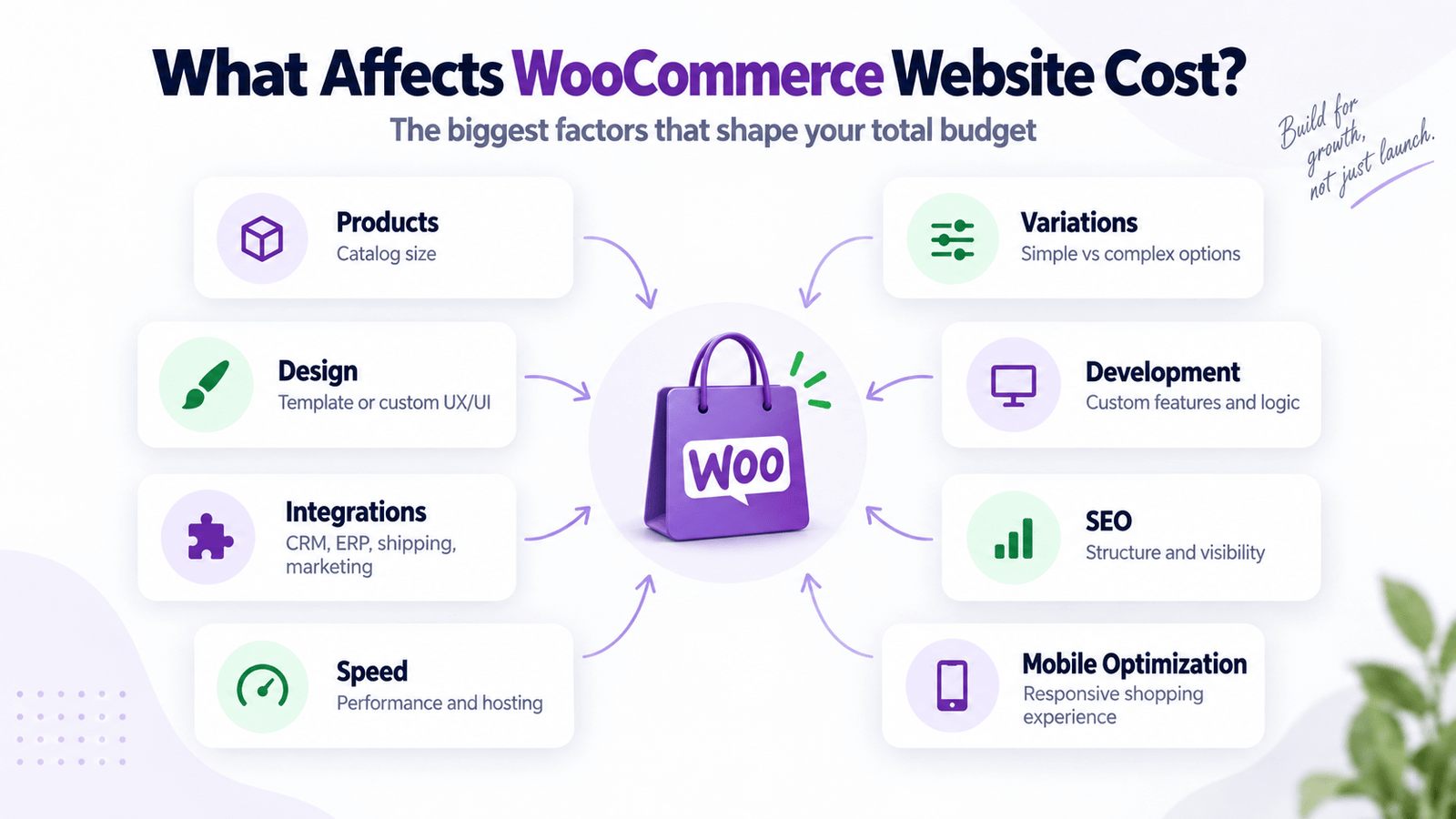
What Affects WooCommerce Website Cost the Most?
There are several major factors that can quickly change your budget.
1. Number of Products
More products generally mean more setup, migration, quality checking, organization, and optimization.
But product complexity matters even more than the raw number.
2. Product Variations
A store selling simple products is much easier to develop and maintain than one containing complicated combinations and conditional options.
3. Custom UI/UX
Custom design requires more strategy, design, development, and responsive work than using a ready-made template.
4. Advanced Functionality
Features such as subscriptions, memberships, bookings, wholesale pricing, custom product builders, and marketplaces increase complexity.
5. Custom Integrations
Connecting WooCommerce with an ERP, CRM, accounting platform, fulfillment provider, warehouse system, marketing platform, or custom API requires additional development.
6. Product Filtering and Search
Larger catalogs often require more sophisticated product discovery tools.
7. Data Migration
Moving thousands of products, customers, orders, reviews, categories, and SEO URLs from another platform can become a significant project by itself.
8. Multilingual and Multi-Currency Requirements
International businesses may require translated content, regional pricing, currency conversion, localized payments, and different shipping rules.
9. Conversion Optimization
Professional conversion-focused design requires more than installing WooCommerce.
It may involve strategically redesigning product pages, category pages, navigation, cart, checkout, trust elements, mobile experience, and customer journeys.
10. Custom Development
The more your business processes differ from standard WooCommerce functionality, the more custom development may be required.
How Much Does a Small WooCommerce Store Cost?
For a relatively simple startup store, a realistic development budget may be:
$500–$1,500+
A typical project at this level might include a ready-made theme, basic WooCommerce configuration, simple products, standard payment gateway, shipping setup, basic responsive design, and essential store pages.
This approach can work well when you’re validating a business idea.
But it may not provide the level of custom branding and conversion optimization needed by a more established business.
How Much Does a Professional Small Business WooCommerce Store Cost?
A professional small-to-medium business WooCommerce website may cost approximately:
$1,500–$5,000+
This type of project may include custom branding, professional UI/UX, optimized product pages, collection/category layouts, product filtering, mobile-first design, speed optimization, SEO-friendly architecture, payments, shipping, conversion improvements, and analytics.
For many growing businesses, this is where the biggest difference between “installing WooCommerce” and building a professional eCommerce website becomes clear.
How Much Does a Custom WooCommerce Website Cost?
A custom WooCommerce store could range from:
$3,000–$15,000+
depending on the requirements.
It may include completely custom UI/UX, advanced filtering, custom product templates, custom checkout experience, subscriptions, membership functionality, wholesale systems, API integrations, advanced shipping logic, personalized products, and custom plugins.
How Much Does an Advanced WooCommerce Store Cost?
Advanced stores may cost:
$10,000–$50,000+
They may involve thousands of products, complex inventory, ERP integrations, CRM synchronization, multiple warehouses, B2B functionality, international selling, advanced pricing, custom product logic, and large-scale automation.
At this level, you’re no longer paying merely for a website.
You’re developing part of the company’s digital commerce infrastructure.
Example WooCommerce Website Budgets
Here are some simplified examples.
| Business Type | Example Development Budget |
|---|---|
| Startup Store | $500–$1,500+ |
| Small Business Store | $1,500–$5,000+ |
| Growing eCommerce Brand | $5,000–$15,000+ |
| Advanced Custom Store | $10,000–$25,000+ |
| Enterprise WooCommerce Project | $20,000–$100,000+ |
Startup WooCommerce Store
Imagine a business selling 20 products.
The owner already has professional images and descriptions.
They need a clean theme, standard product pages, Stripe or WooPayments, basic shipping, mobile responsiveness, and a professional homepage.
A budget of approximately:
$500–$1,500+
may be realistic.
Professional Small Business Store
Now imagine a company with 100 products.
They need professional UI/UX, custom product pages, advanced categories, filters, mobile optimization, SEO setup, payment integration, speed optimization, and conversion-focused design.
A realistic development budget might be:
$1,500–$5,000+
Growing WooCommerce Brand
A growing brand may require hundreds or thousands of products, custom UI/UX, advanced filters, optimized cart and checkout, email integrations, analytics, marketing automation, improved search, and custom functionality.
Possible budget:
$5,000–$15,000+
Advanced WooCommerce Platform
An established company might need wholesale pricing, B2B accounts, subscriptions, ERP integration, multiple warehouses, customer-specific pricing, API connections, custom dashboards, and complex automation.
Possible budget:
$20,000–$100,000+
depending on the project.
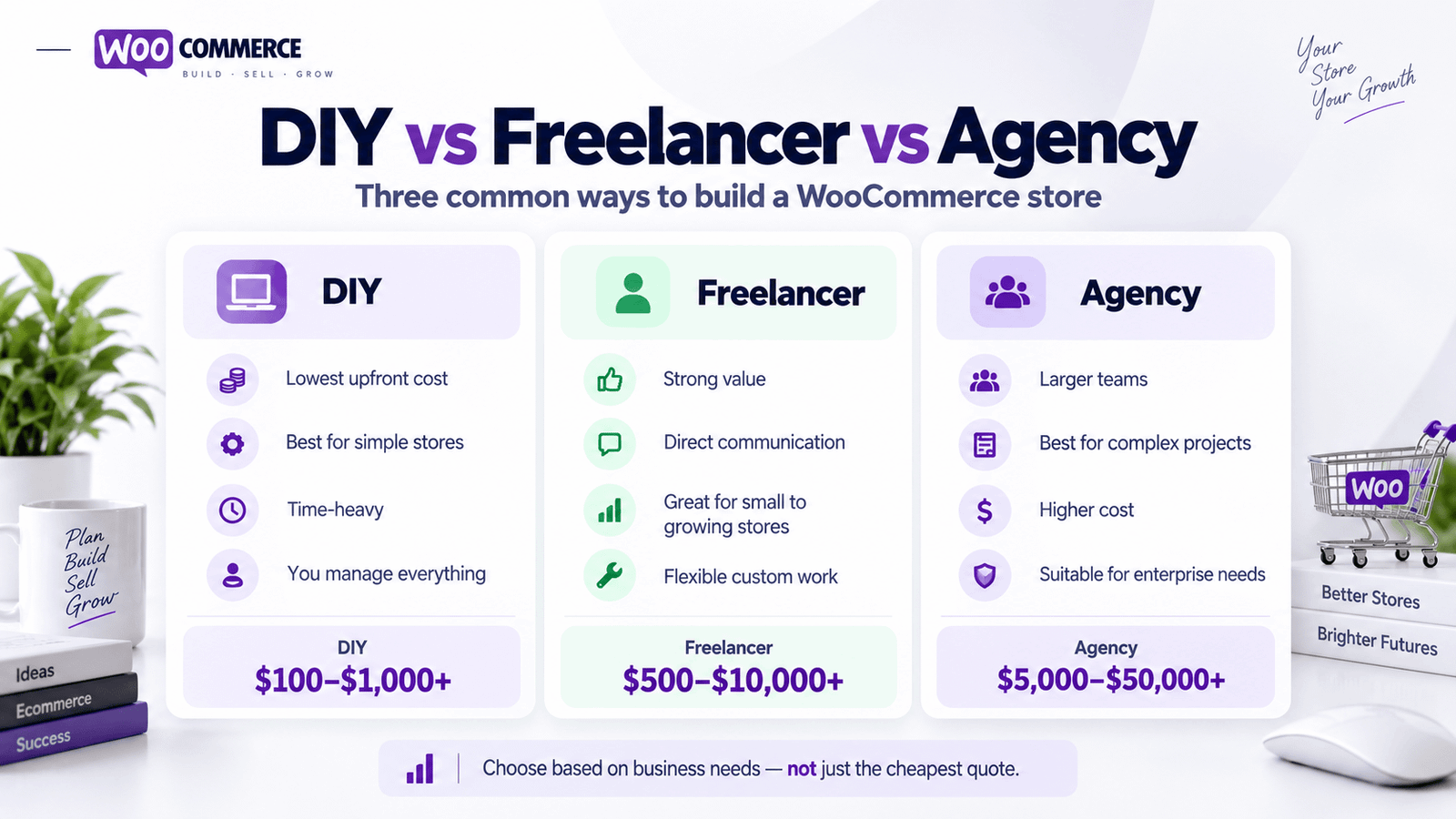
DIY WooCommerce vs Freelancer vs Agency
Who builds your store has a major impact on price.
DIY WooCommerce Store
Possible cost:
$100–$1,000+
DIY can make sense when your budget is extremely limited and your requirements are simple.
You handle WordPress setup, hosting, theme configuration, plugins, product setup, payment gateways, security, SEO, and troubleshooting yourself.
The biggest hidden cost is your time.
Freelance WooCommerce Developer
Possible project cost:
$500–$10,000+
An experienced freelancer can be a strong option for startups, small businesses, and growing eCommerce companies.
You can often work directly with the person designing and developing your website without the overhead associated with a large agency.
WooCommerce Agency
Possible cost:
$5,000–$50,000+
with enterprise projects potentially going significantly higher.
An agency can make sense when a project requires a larger multidisciplinary team involving UX designers, developers, SEO specialists, project managers, conversion specialists, and QA engineers.
The right choice depends on project complexity rather than simply company size.
WooCommerce vs Shopify Cost: Which Is Cheaper?
This is one of the most common questions business owners ask.
There isn’t a universal winner.
WooCommerce itself is free and has no mandatory core platform subscription. Shopify uses a subscription model.
However, WooCommerce requires you to choose and pay for hosting, while Shopify includes hosting in its platform subscription.
WooCommerce may require additional plugins.
Shopify may require paid apps.
Both platforms may require professional design and development.
The real comparison should therefore be based on your total cost of ownership rather than simply the platform’s advertised monthly price.
WooCommerce Can Be Better When You Need More Control
WooCommerce is especially attractive when you want control over:
Hosting, website files, database, custom code, SEO architecture, content, integrations, and complex functionality.
Because the platform is open source, developers have extensive flexibility.
Shopify Can Be Better When You Want Managed Infrastructure
Shopify can be attractive to businesses wanting hosting, platform maintenance, checkout infrastructure, and many commerce features within one managed ecosystem.
Neither choice is automatically better.
The right platform depends on how your business operates.
Hidden WooCommerce Costs You Should Consider
The initial development quote isn’t your entire eCommerce budget.
A serious WooCommerce business should also consider:
| Cost | Frequency |
|---|---|
| Domain | Annual |
| Hosting | Monthly / Annual |
| Premium Theme | Usually One-Time / Annual |
| Premium Plugins | Annual |
| Payment Processing | Per Transaction |
| Backups & Security | Monthly / Annual |
| Maintenance | Monthly / As Needed |
| SEO | One-Time / Ongoing |
| Email Marketing | Monthly |
| Product Photography | Project-Based |
| Development Support | As Needed |
| Advertising | Ongoing |
Understanding recurring costs before launching helps prevent unpleasant surprises later.
How to Reduce WooCommerce Website Cost
Saving money doesn’t require building a poor website.
It requires making smarter decisions.
Start With Essential Features
Separate features into:
Need now and can add later.
If your first store only requires standard products, don’t spend thousands developing an advanced membership system you might never use.
Prepare Your Products Before Development
Prepare product information before your developer starts.
Having finalized titles, descriptions, images, prices, variations, categories, and specifications reduces unnecessary delays.
Choose Plugins Carefully
Don’t install a new plugin for every tiny feature.
Every plugin introduces another dependency.
Where possible, use reputable solutions that handle meaningful business requirements.
Use a Strong Foundation
Saving $200 today by using unreliable hosting, themes, or plugins can create thousands of dollars in future rebuilding costs.
Build for Growth
Don’t overbuild your first store.
But don’t create something that must be completely replaced as soon as your business gets traction.
The ideal solution leaves room for growth.
What Should Be Included in Professional WooCommerce Development?
A professional WooCommerce project should usually address much more than installing the plugin.
Depending on your scope, it may include store configuration, professional UI/UX, responsive development, product pages, category pages, cart, checkout, customer accounts, shipping, payment gateway setup, taxes, filtering, SEO structure, performance, security, analytics, and browser testing.
More advanced projects might also include custom plugins, API integrations, product import systems, ERP integration, B2B functionality, subscription systems, multilingual capabilities, multi-currency, advanced search, custom dashboards, and automation.
Always request a clear scope before development begins.
How Long Does It Take to Build a WooCommerce Website?
A relatively straightforward WooCommerce website might take approximately:
1–4 weeks
More complex projects can take significantly longer.
A proper development process may include:
Requirement analysis → store architecture → UX planning → UI design → development → product setup → payment and shipping → integrations → SEO → speed optimization → mobile testing → checkout testing → launch.
Large custom systems may require several months.
The objective shouldn’t be to launch as quickly as possible.
The objective should be to launch a store capable of supporting real customers and real business growth.
Is WooCommerce Worth It in 2026?
For many businesses, absolutely.
WooCommerce remains especially attractive for companies that value:
Control, flexibility, WordPress integration, SEO capabilities, content marketing, customization, and ownership of their technology stack.
It can support everything from simple physical-product stores to complex business models involving:
Subscriptions, bookings, digital products, memberships, wholesale, marketplaces, customizable products, and B2B eCommerce.
But flexibility also creates responsibility.
Your business needs to manage hosting, updates, security, plugins, and technical maintenance more actively than with some fully hosted platforms.
For businesses that value customization and control, that tradeoff can be worthwhile.
My WooCommerce Website Development Pricing
If you’re currently comparing WooCommerce website development costs, my professional eCommerce Solution starts from $1,499.
It’s designed for businesses that need more than a basic WooCommerce installation.
The package includes:
WooCommerce setup, professional product pages, payment integration, cart and checkout optimization, mobile-first experience, product filtering, and conversion-focused design.
For advanced projects requiring custom development, API integrations, large product catalogs, subscriptions, B2B systems, advanced filters, marketplaces, ERP integrations, or custom plugins, pricing is based on the actual requirements.
The goal isn’t to add unnecessary functionality.
It’s to build the WooCommerce solution your business actually needs.
How to Get an Accurate WooCommerce Website Quote
Before contacting a WooCommerce developer, prepare as much information as possible.
A useful project brief should answer questions about what you sell, how many products you have, whether products contain variations, your preferred design style, the countries you sell to, shipping requirements, payment gateways, custom functionality, integrations, product migration, SEO requirements, expected traffic, launch date, and budget.
The more clearly your requirements are defined, the more accurate the development quote will be.
Frequently Asked Questions About WooCommerce Website Cost
How Much Does a WooCommerce Website Cost in 2026?
A basic WooCommerce store may cost approximately $500–$1,500+, while a professional small business store might cost $1,500–$5,000+.
Customized eCommerce stores can cost $5,000–$25,000+, while advanced enterprise WooCommerce projects can reach $20,000–$100,000 or more.
Is WooCommerce Completely Free?
The core WooCommerce plugin is free and open source.
However, you’ll normally pay for hosting, a domain, development, and potentially premium themes, extensions, maintenance, and payment processing.
Does WooCommerce Charge a Monthly Fee?
WooCommerce does not charge a required monthly subscription for the core platform.
Your hosting provider and other services may charge monthly or annual fees.
How Much Does WooCommerce Hosting Cost?
WooCommerce’s current pricing guidance estimates that hosting for most stores can range around $25–$350 per month, depending on performance and traffic needs.
Very small sites may find cheaper options, while large high-traffic stores may spend considerably more.
How Much Do WooCommerce Plugins Cost?
Many plugins are free.
WooCommerce currently indicates that paid extensions commonly fall around $29–$299 per year each, although some products may cost more or less.
How Much Does a WooCommerce Developer Charge?
A freelance WooCommerce developer may charge from several hundred dollars for small jobs to $10,000+ for complex projects.
Pricing depends heavily on experience, project requirements, custom functionality, integrations, and design.
How Much Does a Professional WooCommerce Store Cost?
For many small and medium-sized businesses, a professional WooCommerce store may require a development budget of approximately:
$1,500–$5,000+
A more customized store may require:
$5,000–$15,000+
or considerably more.
Is WooCommerce Cheaper Than Shopify?
It depends on your requirements.
WooCommerce does not require a core platform subscription, but you need separate hosting and may need paid extensions.
Shopify includes hosting within its subscription but may require paid apps and custom development.
Compare total operating and development costs rather than only the monthly platform fee.
Is WooCommerce Good for SEO?
WooCommerce can be an excellent platform for SEO because it operates within WordPress and provides significant control over content, categories, internal linking, metadata, URLs, and technical optimization.
Strong rankings still require strategy, quality content, technical SEO, authority, and competition analysis.
Can WooCommerce Handle Thousands of Products?
Yes.
WooCommerce can support large catalogs when the store is properly architected and uses suitable hosting, database optimization, search, filtering, caching, and development practices.
A 10,000-product store should not be built using exactly the same infrastructure as a 20-product store.
Can WooCommerce Handle High Traffic?
Yes, but infrastructure matters.
High-traffic WooCommerce stores require appropriate hosting, caching, database optimization, CDN configuration, efficient code, and careful plugin selection.
Can I Redesign an Existing WooCommerce Website?
Yes.
You can redesign the front end while preserving your existing products, customers, orders, and other store data.
A redesign can improve product discovery, navigation, mobile experience, speed, product pages, cart, checkout, branding, SEO, and conversions.
Can I Move From Shopify to WooCommerce?
Yes.
Products, customers, categories, images, orders, and other data can often be migrated from Shopify to WooCommerce.
The migration needs careful planning if your existing Shopify store has significant SEO traffic, customer data, product variants, redirects, or custom functionality.
How Long Does a WooCommerce Project Take?
A relatively straightforward store may take around 1–4 weeks.
A highly customized project may require several weeks or months depending on design, product catalog, integrations, custom functionality, and testing requirements.
Final Thoughts: How Much Should You Spend on a WooCommerce Website?
There isn’t one correct WooCommerce website budget.
A startup testing 20 products shouldn’t necessarily invest the same amount as an established eCommerce brand managing thousands of products and processing significant daily revenue.
Your budget should reflect your:
Business stage, product catalog, customer journey, functionality, integrations, marketing plans, expected traffic, and growth goals.
If you’re starting small, a straightforward WooCommerce setup may be enough.
If you’re building an established eCommerce business, investing in professional design, performance, product discovery, SEO, and conversion optimization becomes much more important.
Remember:
WooCommerce being free doesn’t mean your online store should be built cheaply.
Your website is responsible for helping customers:
Find → Understand → Trust → Buy
A poorly built website can cost your business through slow performance, abandoned carts, poor search visibility, technical problems, low conversion rates, and expensive rebuilding.
A professional WooCommerce website should be treated as a business and sales platform, not simply another WordPress installation.
Get a Free Website Consultation
I’ll review your current website and identify opportunities to improve its design, user experience, mobile usability, performance, SEO, and conversions.

